
Staying connected in Namibia isn’t just about chatting on social media – it’s vital for paying bills, studying online and running a business. MTC is the country’s largest mobile network operator, and whether you’re in Windhoek or a rural village, data bundles are your gateway to the digital world. If you’ve struggled to purchase data bundles before, don’t worry. This friendly guide will walk you through three easy methods to buy MTC data bundles, explain the different types of bundles on offer, and share practical tips to help you get the best value for your money
Why this matters in Namibia
Mobile data has become the lifeblood of modern communication. In Namibia, where fixed broadband coverage is limited and internet cafés are scarce outside urban areas, smartphones provide the main avenue for accessing online services. During the pandemic, many Namibians relied on their phones to work remotely or to attend online classes. With the rise of TikTok and streaming services, data consumption has surged – so understanding how to buy and manage data bundles effectively can save you time and money. MTC continuously introduces new products to meet customer needs; for example, its TikTok bundles were launched as part of “ever evolving solutions in the Namibia market” and are available to both prepaid and post‑paid customers. The company’s commitment to innovative digital solutions is clear, so learning how to navigate its services puts you in control of your connectivity.
Ways to buy MTC data bundles
Below are three convenient methods for purchasing data bundles. Each method requires an MTC SIM card, a device with internet access or airtime, and (for website/app purchases) a VISA or MasterCard. Choose the method that suits you best.
Via the MTC website
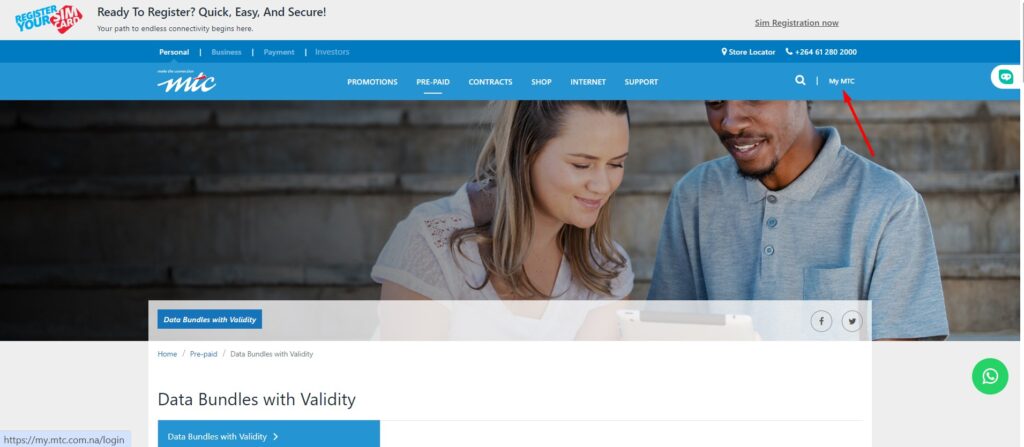
- Visit the official site – Open your browser and go to the MTC website. Click on “My MTC” to access the login page.
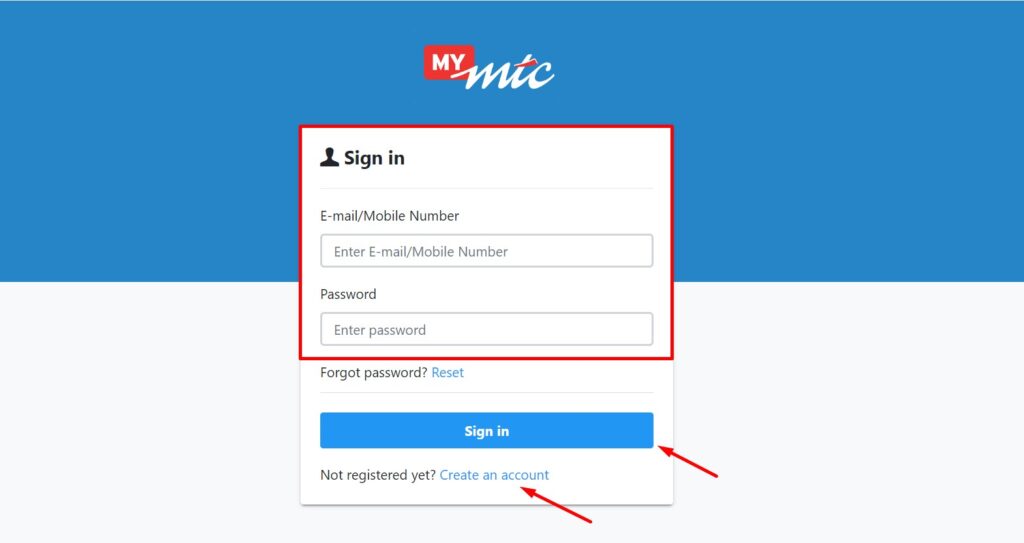
- Log in or register – If you already have a MyMTC account, sign in with your username and password. If not, create an account by following the on‑screen instructions – you’ll need your phone number and email address. MTC uses a one‑time PIN (OTP) sent via SMS to verify your identity.
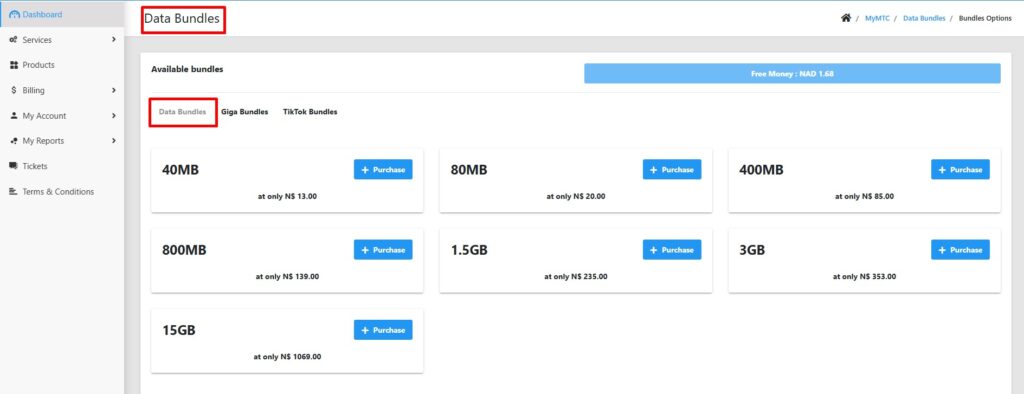
- Navigate to services – Once logged in, your dashboard displays all the numbers linked to your account. On the left‑hand menu, click Services, then select Data bundles.
- Choose your SIM – If you have multiple SIM cards, select the one you want to recharge and click Bundle Options.
- Select a package – A list of available data bundles will appear, ranging from 40 MB for N$13 to 15 GB for N$1 069. Pick the package that suits your needs.
- Pay securely – Proceed to payment. You can pay using a credit or debit card (VISA or MasterCard). After payment, you will receive a confirmation message on your phone, and the data will be credited almost instantly.
Via the MyMTC mobile app
Download the app – Search for MyMTC Namibia in the Google Play Store or Apple’s App Store and install it.
Sign up or log in – Open the app and enter your mobile number. If you haven’t registered, follow the prompts to create an account. If you already have one, log in.
View your account – The app will show your SIM card details and available services. Scroll down to find Data Bundles.

Pick your bundle – The app lists all available data packages at their respective prices. Tap on the bundle you want.
Confirm and receive – Because your SIM is linked to the app, the purchase is instant. You’ll receive a confirmation SMS, and your data balance will update.
Via USSD code
- *Dial 682# – On your mobile phone, enter *682# and press call to access the USSD menu.
- Navigate the menu – You will see several numbered options. To purchase data bundles, reply with 2 (for bundles) and then 1 to select Data bundles.
- Select a package – The menu will display available data packages. Reply with the corresponding number to choose your desired bundle.
- Confirm – The amount will be deducted from your airtime balance, and you will receive an SMS confirming the purchase. The USSD method is ideal if you don’t have access to the internet or a bank card.
Types of bundles on offer
MTC offers more than just standard data bundles. Understanding the options helps you choose the right package for your needs. Below are the main categories available in October 2025. Prices may change, so always check the latest rates before purchasing.
Standard data bundles
These are general-purpose bundles you can use for browsing, social media, work and video calls. Packages include:
| Package | Data Amount | Price (N$) |
|---|---|---|
| Small | 40 MB | 13.00 |
| Medium | 80 MB | 20.00 |
| Large | 400 MB | 85.00 |
| XL | 800 MB | 139.00 |
| XXL | 1.5 GB | 235.00 |
| Mega | 3 GB | 353.00 |
| Ultra | 15 GB | 1 069.00 |
Voice bundles
MTC offers more than just standard data bundles. Understanding the options helps you choose the right package for your needs. Below are the main categories available in October 2025. Prices may change, so always check the latest rates before purchasing.
Streaming bundles
For binge‑watchers, MTC’s streaming bundles allow you to stream services like Netflix, Showmax or YouTube. The bundles are valid for a set period:

- 30 Days – N$229.00 (30 GB).
- 1 Day – N$9.00 (1.5 GB).
- 3 Days – N$25.00 (4.5 GB).
- 7 Days – N$55.00 (7 GB).
These bundles are activated only when you stream; data for other activities will be deducted from your regular bundle.
TikTok bundles
In 2020 MTC launched TikTok data bundles to meet the growing popularity of the social media app. The bundles are available to both prepaid and post‑paid customers and only start when you use the TikTok app. MTC introduced them to provide “innovative digital solutions” for customers. Options include:
- 1 Day – N$5.00 (800 MB).
- 7 Days – N$20.00 (3.5 GB).
- 30 Days – N$50.00 (9.5 GB).
These bundles are ideal for avid content creators and consumers.
E‑learning bundles
Recognising the need for affordable study packages, MTC introduced e‑learning bundles that offer large volumes of data at very low prices, specifically for educational content:
- 3.50 GB – N$8.00.
- 13 GB – N$15.00.
- 32.50 GB – N$30.00.
These bundles support students and teachers accessing online learning platforms at minimal cost.
Practical tips to maximise your data
1. Take advantage of promotions – MTC occasionally offers bonus data or discounts, such as the extra 10 % data that accompanied the TikTok bundles at launch. Follow MTC on social media or check their website for the latest deals.
2. Know your usage patterns – If you mainly watch videos, streaming or TikTok bundles may provide better value. For general browsing, choose standard data bundles. E‑learning bundles are perfect for students.
3. Keep track of your balance – You can dial *682# or use the MyMTC app to check your remaining data. Avoid surprises by monitoring your usage regularly.
4. Use Wi‑Fi when available – Connect to trusted Wi‑Fi networks at home, work or school to conserve your mobile data for when you need it on the go.
5. Update apps over Wi‑Fi – Large downloads and updates can drain your data quickly. Set your phone to update apps only when connected to Wi‑Fi.
6. Beware of auto‑play videos – Turn off auto‑play on social media apps like Facebook and Instagram to reduce data consumption.

Frequently Asked Questions
1. How do I check my remaining data balance? Dial *682# and select the option to view your data balance, or open the MyMTC app and view your current usage on the dashboard.
2. Do MTC data bundles expire? Yes. Each bundle has a set validity period. Standard data bundles expire after a certain number of days (e.g., 30 days for larger bundles). Streaming and TikTok bundles only activate when you start using the respective services, but they also expire after the specified period (1, 7 or 30 days).
3. Can I buy a bundle for someone else? Yes. Use the USSD code *682# and select the “gifting” option (usually under bundles) to buy data for another MTC number. The recipient receives an SMS confirmation.
4. What’s the difference between streaming and regular data bundles? Streaming bundles are dedicated to video streaming platforms like Netflix, Showmax, YouTube and NBC Plus. They cannot be used for general browsing or social media. Regular data bundles can be used for any internet activity.
5. Are there hidden charges when buying through the website or app? No. The price you see is what you pay. However, your bank may charge a small card processing fee depending on your account. Make sure you have sufficient funds in your account.
Our Thoughts
Buying data bundles from MTC is easy once you know how. Whether you prefer the convenience of the MyMTC app, the security of the website or the simplicity of the USSD menu, there’s a method that fits your lifestyle. Understanding the different bundle types – standard data, voice, streaming, TikTok and e‑learning – will help you choose the best package for your needs and budget. Remember to monitor your usage, take advantage of promotions and explore specialised bundles to stretch your dollars.
If you found this guide helpful, share it with friends or family members who are still figuring out how to stay connected. Don’t forget to explore our other articles on PhiskyBox:
- SIM registration made easy – Learn how to register your MTC or TN Mobile SIM card online or in person (See: How to register your SIM cards, MTC and TN Mobile SIM cards).
- Understanding a budget and its importance – Discover practical tips to organise your spending and ensure you always have funds for essentials like data (See: Understanding a budget and its importance).
- Navigating Tax in Namibia – Stay informed about taxes and how to manage your finances responsibly (See: Navigating Tax in Namibia).
Ready to level up your connectivity? Pick your bundle, manage your usage and stay tuned to PhiskyBox for more smart money tips in Namibia and beyond.

